Multicast Tunneling over Disparate Subnets
By Sharky
Multicast is an amazing technology available in virtually all networking hardware out there. Virtually all IP routers on the cloud or in your company intranet are capable of multicast out of the box! so why it is so cool? Because it allows computers to communicate with each other with little or no configuration whatsoever, a feature that gave rise to the phrase “ZeroConf”, perhaps you heard about it.
If you are a Mac or Apple product user, you probably have been using ZeroConf/multicast already: when you turn on your MacBook and plugin your printer to the network or any Apple media device, perhaps you noticed that your desktop, will find the printer or device magically so you can start using it without having to search or even worse configure IP addresses/ports or other kinds of confusing things. Thanks to the power of multicasting all this is possible:
- Computers, and other devices: printers, audio, video devices can find each other in a local IP network. This is sometimes referred as auto discovery.
- Devices can talk to each other via multicast, for example they can send/receive text or binary data, be that chat, audio or video. Possibilities are endless.
- Multicast is efficient: It uses UDP datagrams to send bytes over IP networks. This gives superior performance over TCP. Although the caveat vs TCP is that data packets can be lost. TCP guarantees packets are received at the other end, Multicast does not.
- Multicast can be used for application clustering, so all your apps can communicate without cumbersome configuration: Just startup all your apps and boom! They discover themselves and talk to each other: Ain’t that the coolest thing ever!
As a matter of fact, multicast is commonly used by video conferencing software, especially on the enterprise by all major IT vendors. In this article, I decided to share my humble experiences when working on a clustering system for my IT organization using multicast as well other standard technologies.
Multicast Clustering: A Hidden Jewel
So I found myself at work with the task of providing clustering functionality to all products within my organization. We looked at a lot of software out there, perhaps you find yourself in a similar situation:
- Most server side apps suffer from a dearth of high availability and fault tolerance.
- As user load on your product increases, it becomes critical that your app becomes fault tolerant: automatically restarts on crashes, it is able to handle ever increasing numbers of clients or users, it can talk to other apps/nodes in your network to share information.
It was a rough period trying to figure out the most efficient way to provide fault tolerance and clustering to our products, although there are many open source software in the wild to tackle the situation:
- Hazelcast: It is an in-memory platform for clustering applications using a combination of TCP and multicast protocols.
- In-memory object caches there are dime a dozen: GridGain (very similar to Hazelcast), memcached, redis, etc.
- Distributed key-value stores such as etcd which is incidentally used in the mighty Kubernetes orchestration system and other distributed systems.
We used Hazelcast as our group is mainly Java based shop that needs to support both Windows and Linux. It seemed like the best choice at the time, but as the months dragged on, I found few things I didn’t like:
- A beefy library at around 4MB it bloated the size of our app by 33%.
- Hazelcast used a combination of Multicast and TCP sockets for service discovery and does require configuration.
- Sluggish performance when connecting large numbers of nodes.
On the plus side Hazelcast packs:
- A lot of distributed data structures: Maps, Lists, Queue, Executors, Locks, and more.
- It is a ready to go tool which is great for small teams with limited resources.
As the time passed I grew dissatisfied with mysterious bugs with distributed data structures: maps missing values, connections problems due to configuration mishaps, and poor performance with multiple nodes. By that time I stumbled into the slick features of multicast sockets and thought they were the coolest thing I’ve seen for a long time:
- A MulticastSocket is a DatagramSocket that allows computers to join groups and send packets of bytes via UDP to all members of such group.
- A multicast group is a special purpose IP address in the range 224.0.0.0 to 239.255.255.255. These addresses can be used to broadcast data among members.
- Most hardware routers support multicast. This means that they understand multicast groups and handle the message delivery to their respective members.
- The only thing members need to agree is in the multicast group (address) and a port number, and they are ready to go.
So in listing 1, I present a general purpose multicast class (NetMulticater) capable of broadcasting 8KB packets over multicast group 224.1.2.3 port 6789. Let’s take a closer look.
package com.cloud.core.net;

import java.io.IOException;
import java.net.DatagramPacket;
import java.net.InetAddress;
import java.net.MulticastSocket;
import java.net.SocketException;
import java.nio.charset.Charset;
import java.util.Arrays;

import com.c1as.cloud.core.types.CoreTypes;

/**
 * A very simple multi-cast sender/receiver: IP Multicast is an extension to the standard IP network-level protocol. RFC 1112.
 * IP Multicasting as: "the transmission of an IP datagram to a ‘host group’, a set of zero or more hosts identified by a single IP
 * destination address. A multicast datagram is delivered to all members of its destination host group with the same ‘best-efforts’
 *
 * <ul>
 * <li>See https://docs.oracle.com/javase/7/docs/api/java/net/MulticastSocket.html
 * <li>https://www.csie.ntu.edu.tw/~course/u1580/Download/Multicast/howipmcworks.html
 * </ul>
 *
 *
 */
public class NetMulticaster {

    /** Default address */
    public static final String DEFAULT_ADDR = "224.1.2.3";

    /** Default port */
    public static final int     DEFAULT_PORT = 6789;

    /** Several standard settings for TTL are specified for the MBONE: 1 for local net, 15 for site, 63 for region and 127 for world. */
    public static final int     DEFAULT_TTL = 15;

    String  address     = DEFAULT_ADDR;
    int     port        = DEFAULT_PORT;

    // receive buffer size (8K). The send buffer size cannot exceed this value or extra data will be dropped!.
    int     bufferSize  = 8192;

    // The socket
    protected MulticastSocket   s;

    // Multi cast group
    protected InetAddress       group;

    // 1 thread to receive stuff.
    protected Thread            receiver;

    // Listener used to send messages.
    protected MessageListener   listener;

    public static interface MessageListener {
        void onMessage (byte[] bytes);
    }

    public NetMulticaster()  {
    }

    /**
     * Construct
     * @param address Multicast UDO address.
     * @param port Multicast port.
     */
    public NetMulticaster(String address, int port)  {
        this.address    = address;
        this.port       = port;
    }

    /**
     * Create a {@link MulticastSocket} with the default TTL (15).
     * @throws IOException On socket errors.
     */
    public void open () throws IOException {
        open(DEFAULT_TTL);
    }

    /**
     * Create a {@link MulticastSocket} with the given TTL.
     * @param TTL Time-to-live: Several standard settings for TTL are specified for the MBONE: 1 for local net, 15 for site, 63 for region and 127 for world.
     * @throws IOException On socket errors.
     */
    public void open (int TTL) throws IOException {
        s   = new MulticastSocket(port);
        // Several standard settings for TTL are specified for the MBONE: 1 for local net, 15 for site, 63 for region and 127 for world.
        s.setTimeToLive(TTL);
    }

    /**
     * Set the multicast arguments. See https://docs.oracle.com/javase/7/docs/api/java/net/MulticastSocket.html
     * @param address Multi-cast address. Default: 224.1.2.3
     * @param port Multi-cast port. Default: 6789
     * @param bufferSize Multi-cast receive buffer size. Default: 2048
     */
    public void configure (String address, int port , int bufferSize) {
        this.address    = address;
        this.port       = port;
        this.bufferSize = bufferSize;
    }

    /**
     * Set the multicast arguments. See https://docs.oracle.com/javase/7/docs/api/java/net/MulticastSocket.html
     * @param address Multi-cast address. Default: 224.1.2.3
     * @param port Multi-cast port. Default: 6789
     */
    public void configure (String address, int port ) {
        configure(address, port, DEFAULT_PORT);
    }

    public void setListener (MessageListener l) {
        listener = l;
    }

    /**
     * Join the multicast group given by the default address (224.1.2.3) and port (6789).
     * @throws IOException
     */
    public void joinGroup () throws IOException {
        group   = InetAddress.getByName(address);
        s.joinGroup(group);
    }

    public void shutdown () throws IOException {
        if ( s != null) {
            s.leaveGroup(group);
            s.close();
            s = null;
        }

        stopThread();
    }

    public boolean isClosed () {
        if ( s == null) {
            return true;
        }
        return s.isClosed();
    }

    private void stopThread() {
        if ( receiver == null ) {
            return;
        }
        try {
            receiver.interrupt();
            receiver.join(2000);
        } catch (InterruptedException e) {
        }
    }

    /**
     * Send a packet to the multicast group.
     * @param msg Message bytes.
     * @throws IOException On I/O errors.
     */
    public void send (final byte[] msg) throws IOException {
        // guard against someone trying to send when the socket has been shutdown (null)
        if ( s == null) {
            return;
        }
        DatagramPacket hi = new DatagramPacket(msg, msg.length, group, port);
        s.send(hi);
    }

    /**
     * Send a text message.
     * @param text Text to send.
     * @throws IOException On I/O errors.
     */
    public void send (final String text) throws IOException {
        byte[] bytes = text.getBytes(Charset.defaultCharset());
        // In UDP there is no reading in chunks . If the size of the message > receive buffer size
        // then data is dropped. See https://stackoverflow.com/questions/15446887/udp-read-data-from-the-queue-in-chunks
        if ( bytes.length > bufferSize) {
            throw new IOException("Send failure for [" + text.substring(0, 32) + " ...] (MAX BUFFER SIZE " + bufferSize + "/" + bytes.length + " EXCEEDED)");
        }
        send(bytes);
    }

    public void receive () {
        receiver = new Thread(new Runnable() {
            public void run() {
                while ( true) {
                    try {
                        read();
                    }
                    catch (SocketException so) {
                        // socket closed?
                    }
                    catch (IOException e) {
                        e.printStackTrace();
                    }
                    try {
                        Thread.sleep(500);
                    } catch (InterruptedException e) {
                        Thread.currentThread().interrupt();
                        break;
                    }
                }
            }
        }, "MULTICAST-RECEIVER-" + CoreTypes.NODE_NAME);
        receiver.start();
    }

    private void read () throws IOException {
        // get their responses!
        byte[] buf          = new byte[bufferSize];
        DatagramPacket recv = new DatagramPacket(buf, buf.length);

        // this blocks until data is received
        s.receive(recv);

        int len = recv.getLength();
        if ( listener != null) {
            listener.onMessage(Arrays.copyOf(buf, len));
        }
    }

    /**
     * Get the {@link MulticastSocket} time to live (TTL)
     * @return Default TTL.
     * @throws IOException On I/O errors.
     */
    public int getTimeToLive() throws IOException {
        return s != null ? s.getTimeToLive() : 0;
    }

}
Listing 1: A general purpose multicaster capable of sending 8KB of data over address 224.1.2.3 port 6789.
The Java language has built-in support for mulicasting by means of the class java.net.MulticastSocket, thus, to join a multicast group or address, we simply do:
InetAddress group = InetAddress.getByName("228.5.6.7");
int port = 6789;
MulticastSocket socket = new MulticastSocket(port);
socket.joinGroup(group);
By executing the lines above in all our apps we have effectively created a virtual group (or cluster) we can use to send all kinds of messages: text, binary, etc. The great thing about this is that the IP router hardware understands that the address-port combo 224.1.2.3/6789 is a special purpose multicast endpoint. Your apps need not worry about delivery or configuration. Let the router worry about that. Finally, to send/receive a message:
// send
String msg = “Howdy stranger”;
DatagramPacket hi = new DatagramPacket(msg.getBytes(), msg.length(), group, port);
socket.send(hi);

// receive
byte[] buf = new byte[1024];
DatagramPacket recv = new DatagramPacket(buf, buf.length);
socket.receive(recv);
Give the NetMulticater a test spin by using the test classes in listing 2.
// NetMulticaster - Sender: TestZeroSender.java
public class TestZeroSender {

    public static void main(String[] args) {
        try {
            Multicaster m = new Multicaster();
            m.joinGroup();
            m.send("Hello World");

            Thread.sleep(10000);
            System.out.println("Sender Shutdown.");
            m.shutdown();
        } catch (Exception e) {
            e.printStackTrace();
        }
    }
}
// NetMulticaster - Receiver: TestZeroReceiver.java
public class TestZeroReceiver {

    public static void main(String[] args) {
        try {
            Multicaster m = new Multicaster();
            m.setListener(new MessageListener() {

                @Override
                public void onMessage(byte[] bytes) {
                    String s = new String(bytes);
                    System.out.println("Receiver Got: " + s + "]");

                }
            });
            m.joinGroup();
            m.receive();

            Thread.sleep(10000);
            System.out.println("Receiver Shutdown.");
            m.shutdown();
        } catch (Exception e) {
            e.printStackTrace();
        }
    }
}
Listing 2: Sender-Receiver test classes for NetMulticaster.java.
Some Things are just too Good to be True
My excitement about using multicast for service discovery and distributed clustering crashed for a while when I dug into some the caveats of this great technology:
- Multicast packets can only travel within the same subnet. For example, let’s say you have to IP networks at your organization: 192.168.x.x for computers in your lab and 10.0.x.x for regular employees. If you deploy your multicast capable app in both networks (One at the lab on host 192.168.0.1 and another at your office 10.0.2.1). The apps won’t be able to receive the packets. That’s because multicast traffic is restricted to the same subnet (192.168.x cannot talk to 10.0.x and vice versa). This is a built-in feature in the hardware for obvious reasons:
- Multicast flooding: Imagine routers not dropping multicast traffic over different subnets, then malicious users could use it to flood your network and the whole web for that matter with spam thus creating a denial of service threat.
- Routing loops and other sorts of router misconfiguration and-or poorly designed data senders-receivers can wreak havoc in your network.
- I must admit that caveat 1 was a low blow in my effort to use multicast to implement a clustering solution for my organization. Nevertheless I still believed that it was the way to go, and a found a way out in the form of multicast tunneling.
Tunneling Multicast Traffic over Separate Networks
There is a technique that allows for multicast packets to hop over disparate networks bypassing the restrictions set the by the router hardware. It is called multicast tunneling and it works like this: Assume you have two or more separate networks (as shown in figure 1). By using a specialty software component called a multicast tunnel, the multicast packets can be transmitted by a virtual tunnel using standard UDP. Note that routers will allow standard UDP pass through to the other network. Once the multicast packet arrives at the other side of the tunnel, the receiver (specialty software) will relay the standard UDP packet via multicast to all members in the second network, and voila! We have transmitted a multicast packet across two different networks. Note that this requires the specialty software to be present in both sides of the tunnel.
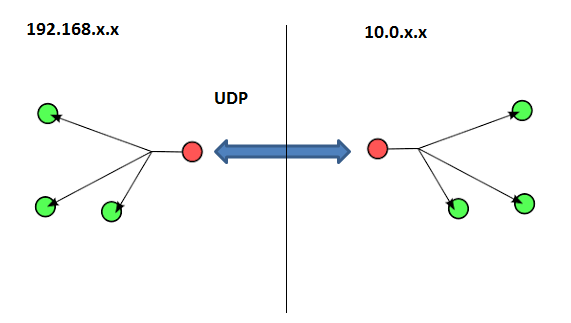
There are several ways to accomplish multicast tunneling:
- Via hardware by configuring network routers to tunnel the traffic. This is a difficult option as system administrators will be reluctant to do this due to the security threats inherent to multicasting. As a matter of fact, I tried to push for this in my organization in a desperate attempt to find a solution to my dilemma but was quickly shut down by management/system administration. This is probably a no go option.
- Via multicast tunneling software. There is a lot of software out there to provide the tunneling capabilities we desire, however I found this to be difficult:
- Most of the free software I found was Linux based, very difficult to install and even worse to configure. This will defeat the purpose of my goal of a clustering system with zero configuration. Not to mention that the software was Linux only (although there is probably a commercial Windows solution out there).
- Having to deploy extra software make the whole thing to awkward, to develop, install and manage.
- When tunneling software is not an option why not do it yourself? Looking at figure 1 it doesn’t seem too complicated, all we need is an extra UDP client-server on each side as a companion to the existing NetMulticater from listing 1.
Do-it Yourself Multicast Tunneling
The class in listing 2 is a little beefy but will get the job done. It basically does what figure 1 shows:
- Thanks to the powerful TCP features of the Java language, MulticastTunnel packs simple UDPClient and UDPServer inner classes. These are used to relay the multicast packets from one endpoint of the tunnel to the other.
- Both Multicast Sockets and UDP Sockets (known in Java as DatagramSocket) use DatagramPackets to send-receive data. This makes the relay process a breeze as the data is essentially the same. The only difference is the address and the way is sent through the network.
- The class MulticastTunnel must run on both endpoints of the two networks. Each endpoint spawns a UDP Server to receive and a UDP client to relay the multicast packet.
- MulticastTunnel uses NetMulticaster from listing 1 to join the local multicast group (address) in its local network, it then listens for multicast traffic, when a packet is received, the sender endpoint relays it using its local UDP client. In the other side (network), the local UDP Server receives the packet, and broadcasts to its local multicast network. The process works both ways.
public class MulticastTunnel {

    static void LOGE(String text) {
        System.err.println("[MCAST-TUNNEL] " + text);
    }

    static void LOGD(String text) {
        System.out.println("[MCAST-TUNNEL] " + text);
    }

    static final int DEFAULT_UDP_SERVER_PORT = 4445;

    // Used to receive from the remote endpoint
    private UDPServer server;

    // Used to send to the remote endpoint
    private UDPClient client;

    // Used to listen/bcast in the local subnet
    private NetMulticaster multicaster;

    // Used to prevent feedback loops
    private static final List<String> hashes = new CopyOnWriteArrayList<String>();

    // If true dump info to stdout
    private static boolean debug;

    // metric: total packets send/received
    private long packetsSent;

    // metric: total bytes sent/received
    private long bytesSent;

    // metric: uptime (ms)
    private long upTime;

    /**
     * The UDP server listens for packets in the local endpoint
     *
     * @author VSilva
     *
     */
    static class UDPServer extends Thread {
        private DatagramSocket socket;
        private boolean running;
        private byte[] buf              = new byte[8192];
        NetMulticaster multicaster;
        private long bytesRecv, packetsRecv;    // metrics

        public UDPServer(int port , NetMulticaster caster) throws IOException {
            super("MULTICAST-TUNNEL-" + CoreTypes.NODE_NAME);
            this.socket         = new DatagramSocket(port);
            this.multicaster    = caster;
            LOGD("Started UDP Server @ port " + port);
        }

        @Override
        public void run() {
            running = true;
            LOGD("Running UDP server @ " + socket.getLocalAddress() + ":" + socket.getLocalPort());

            while (running) {
                DatagramPacket packet = new DatagramPacket(buf, buf.length);
                try {
                    // this blocks execution until a packet is received...
                    socket.receive(packet);

                    final int len       = packet.getLength();
                    final byte[] data   = Arrays.copyOf(buf, len);
                    final String hash   = HASH(data);

                    // must be sorted. Else won't work!
                    final int idx       = Collections.binarySearch(hashes, hash);

                    if ( idx < 0 ) {
                        LOGD("UDP Server received " + len + "/" + buf.length + " bytes. Found: " + idx + " Multicasting");
                        multicaster.send(data);

                        // metrics
                        packetsRecv ++;
                        bytesRecv   += len;

                        addSortHashes(hash);
                    }
                    else {
                        LOGD("UDP Server received " + len + "/" + buf.length + " bytes. Hash: " + hash + " Packet already sent.");
                    }
                }
                catch (SocketException se ) {
                    // Swallow
                }
                catch (Exception e) {
                    e.printStackTrace();
                    LOGE("UDPServer:run(): " + e.toString());
                }
            }
        }

        public void shutdown () throws IOException {
            running = false;
            if ( socket != null) {
                socket.close();
            }
            packetsRecv = bytesRecv = 0;
        }
    }

    /**
     * Hashed packets must be sorted, else Collections.binarySearch won't work!
     * @param hash
     */
    private static void addSortHashes (final String hash) {
        hashes.add(hash);
        //Collections.sort(hashes); Cant sort CopyOnWriteArrayList - throws UnsuportedOperationException

        // How to sort CopyOnWriteArrayList
        // https://stackoverflow.com/questions/28805283/how-to-sort-copyonwritearraylist
        Object[] a = hashes.toArray();
        Arrays.sort(a);
        for (int i = 0; i < a.length; i++) {
            hashes.set(i, (String) a[i]);
        }
    }

    /**
     * The UDP client forward packets to the remote {@link UDPServer}.
     * @author VSilva
     *
     */
    static class UDPClient {
        private DatagramSocket socket;
        private InetAddress remoteHost;
        private int remotePort;

        public UDPClient(String remoteHost, int remotePort) throws SocketException, UnknownHostException {
            super();
            this.remoteHost = InetAddress.getByName(remoteHost);
            this.remotePort = remotePort;
            this.socket     = new DatagramSocket();
            LOGD("Started UDP Client to remote " + remoteHost + " @ " + remotePort);
        }

        public void send(byte[] buf) throws IOException {
            //LOGD("UDP Client: sending " + buf.length + " bytes to " + remoteHost + ":" + remotePort);
            DatagramPacket packet = new DatagramPacket(buf, buf.length, remoteHost, remotePort);
            socket.send(packet);
        }

        public void shutdown () {
            if ( socket != null) {
                socket.close();
            }
        }
    }

    public MulticastTunnel() throws IOException {
    }

    /**
     * Construct a multicast tunnel.
     * @param udpServerPort The port of the local {@link UDPServer}. Default: 9876
     * @param remoteHost IP address or host name of the remote endpoint {@link UDPServer}.
     * @param remotePort Port of the remote {@link UDPServer}. Default: 9876
     * @throws IOException on I/O/Socket errors.
     */
    public MulticastTunnel(int udpServerPort , String remoteHost, int remotePort) throws IOException {
        init(udpServerPort, remoteHost, remotePort);
    }

    private void init (int udpServerPort , String remoteHost, int remotePort ) throws IOException {
        // 224.1.2.3 : 6789
        this.multicaster    = new NetMulticaster();
        this.server         = new UDPServer(udpServerPort, multicaster);
        this.client         = new UDPClient(remoteHost, remotePort);

        this.multicaster.setListener(new NetMulticaster.MessageListener() {

            @Override
            public void onMessage(byte[] bytes) {
                final String hash       = HASH(bytes);

                // must e sorted. Else won't work!
                final int idx           = Collections.binarySearch(hashes, hash);

                //LOGD("Multicast: got " + bytes.length + " bytes. Hash:" + hash + " found:" + idx);
                try {
                    if ( idx < 0 ) {
                        LOGD("Multicast: Tunneling " + + bytes.length + " bytes.");
                        client.send(bytes);

                        // metrics
                        packetsSent ++;
                        bytesSent   += bytes.length;

                        addSortHashes(hash);
                    }
                    else {
                        //LOGD("Multicast: Packet " + hash + " already sent.");
                    }

                    if ( hashes.size() > 200) {
                        LOGD("Cleaning hash list.");
                        hashes.clear();
                    }
                } catch (IOException e) {
                    LOGE(e.toString());
                }
            }
        });
        this.multicaster.open();
        this.multicaster.joinGroup();
        this.multicaster.receive();
    }

    public void start () throws IOException {
        if ( server == null || client == null || multicaster == null) {
            throw new IOException("Invalid constructor invoked.");
        }
        upTime  = System.currentTimeMillis();
        server.start();
    }

    public void start (int udpServerPort , String remoteHost, int remotePort ) throws IOException {
        if (isRunning()) {
            return;
        }
        upTime  = System.currentTimeMillis();
        init(udpServerPort, remoteHost, remotePort);
        server.start();
    }

    public void shutdown () throws IOException {
        LOGD("Shutting down multicast tunnel.");
        upTime = packetsSent = bytesSent = 0;
        if ( server != null) {
            server.shutdown();
        }
        if ( client != null) {
            client.shutdown();
        }
        if ( multicaster != null ) {
            multicaster.shutdown();
        }
        server      = null;
        client      = null;
        multicaster = null;
    }

    public boolean isRunning () {
        return server != null && client != null && multicaster != null;
    }

    /**
     * MD5 digest tool. It should only be used to generate an instance ID. MD5 hashes are not secure.
     * @param string String to digest.
     * @return Hex encoded MD5.
     */
    static String HASH(final byte[] bytes) {
        try {
            java.security.MessageDigest md = java.security.MessageDigest.getInstance("SHA-256");
            byte[] digest = md.digest(bytes);

            StringBuffer sb = new StringBuffer();

            for (int i = 0; i < digest.length; ++i) {
                sb.append(Integer.toHexString((digest[i] & 0xFF) | 0x100).substring(1,3));
            }
            return sb.toString().toUpperCase();
        }
        catch (java.security.NoSuchAlgorithmException e) {
        }
        return null;
    }

    public static void setDebug (boolean debug) {
        MulticastTunnel.debug = debug;
    }

    public long getPacketsSent () {
        return packetsSent;
    }
    public long getBytesSent () {
        return bytesSent;
    }

    public long getPacketsRecv () {
        return server != null ? server.packetsRecv : 0;
    }

    public long getBytesRecv () {
        return server != null ? server.bytesRecv : 0;
    }

    public long getUptime () {
        return upTime;
    }

}
Listing 3 Multicast Tunneling using standard UDP client-server endpoints.
Multicast tunneling will allow you to send multicast traffic over separate networks, and you can test it using the test code in listing 3. The test procedure works in the following way:
- Assuming two different networks in your organization: 192.168.x and 10.0.x. Pack NetMulticaster.java (listing 1), MulticastTunnel.java (listing 3), and TestMulticastTunnel.java (listing 4) in your project. Add a batch file to start the main method in TestMulticastTunnel with arguments given from the command line.
- Deploy the project in two separate hosts in both networks. Let’s assume 192.168.1.2 and 10.0.0.1 with the command arguments:
- TestMulticastTunnel 10.0.0.1 8000 true (node 1 on net 192.168)
- TestMulticastTunnel 192.168.1.2 8000 true (node 2 on net 10.0)
- The tunnel is now online on both networks over UDP port 8000. Finally use the NetMulticaster test code (TestZeroSender in listing 2) to send a multicast message in network 1 and look at the console of the MulticastTunnel endpoint in network 2 for a receipt. The packet will then be multicasted in network 2 (If you run TestZeroreceiver in network 2 the message will display at the console. Great success!)
public class TestMulticastTunnel {
  public static void main(String[] args) {
    try {
      if ( args.length < 2) {
        throw new Exception("USAGE: " + MulticastTunnel.class.getSimpleName() + " REMOTE_HOST REMOTE_PORT [DEGUG:{true/false}]");
      }
      String remoteHost   = args[0];
      int remotePort    = Integer.parseInt(args[1]);
      boolean debug       = args.length == 3 ? Boolean.parseBoolean(args[2]) : false;

      MulticastTunnel.setDebug(debug);
      MulticastTunnel tunnel = new MulticastTunnel(remotePort, remoteHost, remotePort);
      tunnel.start();

    } catch (Exception e) {
      e.printStackTrace();
    }
  }
}
Listing 4: Test class for MulticastTunnel.java
Caveats of Multicast Tunneling
The classes in listing 1 and 3 provided a simple solution to my goal of a zero configuration service discovery and clustering solution for my organization, but there were several caveats found along the way:
- Feedback loops: If care is not taken with MulticastTunnel.java (listing 3), and endless loop can occur. If node 1 (network1) in the tunnel receives a multicast packet, sends it via UDP to node2 (network2). Node2 receives, then multicasts to its local network2. Trouble occurs when node2 receives the multicast packet it just sent (Because node2 is a member of the multicast network itself – it will receive the packet it sent). Big trouble occurs when node2 tries to relay that packet back to node1 thus creating and endless loop.
- Loops may occur because all members of a multicast group will receive. So if you have 3 hosts in a group: host1, host2, host3, and host1 sends 1 packet then host1 will send it and receive it too. In an early interaction of my code in listing 3 I didn’t realize this, so when testing I saw 1 packet being sent to network2 then the same packet being sent back from network2 flooding the whole thing with and endless loop!
- Loops can be avoided by hashing the multicast packets, saving the hashes in a sorted list after being sent, then whenever a new packet arrives, its hash is checked against the list, if a hash exists, then its been sent already so skip the send operation. This technique is shown in the following snippet (see listing 5) from MulticastTunnel.java.
this.multicaster.setListener(new NetMulticaster.MessageListener() {

  @Override
  public void onMessage(byte[] bytes) {
    // hash packet
    final String hash     = HASH(bytes);

    // search for it (if found idx > 0)
    final int idx       = Collections.binarySearch(hashes, hash);

    try {
      if ( idx < 0 ) {
        // send via UDP
        client.send(bytes);
        // save hash int sorted hashes list
        addSortHashes(hash);
      }
      else {
        //
      }
      // clean hash list
      if ( hashes.size() > 200) {
        hashes.clear();
      }
    } catch (IOException e) {
      LOGE(e.toString());
    }
  }
});
Listing 5: Avoid recursive feedback loops in MulticatTunnel.java.
Multicast tunneling provided a simple solution for a zero configuration app discovery and data clustering system in my organization. Although there are some security issues inherent to this technology (flooding, loops, angry sysadmins, increased network traffic), I believe the benefits outweigh the risks. I tested only with small text based JSON messages less than 8KB over a period of weeks with no issues in my network. Of course more testing is always required, large packets of binary data for example. All in all, the solution worked for me. I simply put some metrics in MulticastTunnel.java and was able to monitor the number of packets/bytes sent-received over the network for some extra peace of mind. I hope this simple code is useful for somebody out there running into the same problem. I believe Multicast is a hidden jewel that has not received the love from developers it deserves.
 Sharky's DevOps Corner